Change your Facebook password
A strong password that's different from all your other accounts.
4 steps
- 1
Step 1
Change password
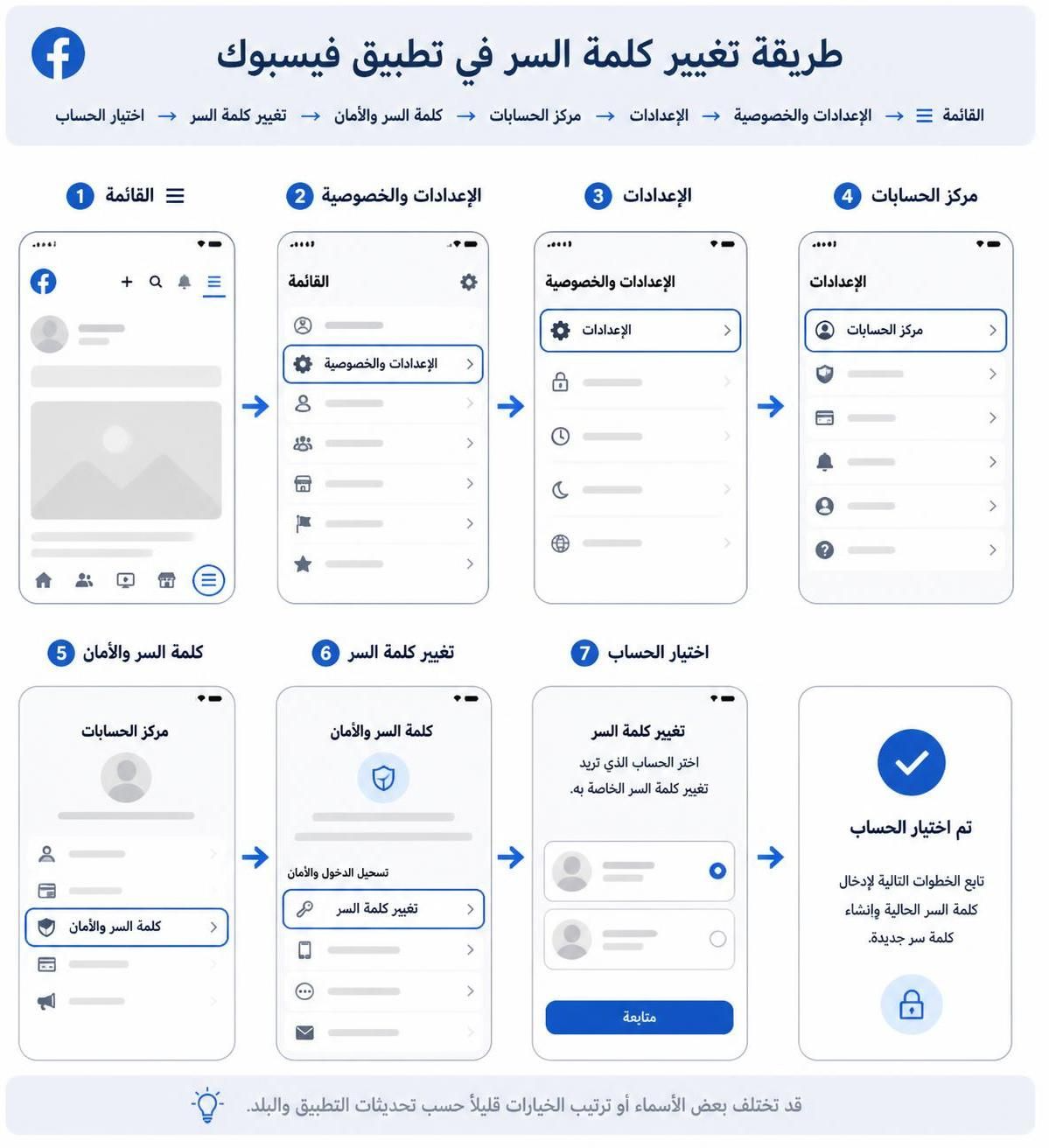
Menu ☰ ← "Settings & privacy" ← "Settings" ← "Accounts Center" ← "Password and security" ← "Change password" ← choose your account.
Tip: Use a strong, unique password of at least 12 characters with uppercase, lowercase, numbers, and symbols. Never reuse it across other accounts.
- 2
Step 2
Type the new password
Enter your current password, then the new one twice.
Tip: 12 characters or more, or a phrase of 4 unrelated words. Check its strength in Sndak: "Check" ← "Password strength".
- 3
Step 3
Log out of other devices
If you see the option "Log out of other devices", turn it on, then save.
Tip: This kicks out anyone who may have been logged into your account.
- 4
Step 4
Don't reuse it anywhere else
Use this password for Facebook only.
Tip: If your password leaks from any other site, attackers try it on Facebook right away.