Turn on two-step verification in WhatsApp
A secret 6-digit PIN that stops anyone from activating your number on another phone, even if they get the SMS activation code.
5 steps
- 1
Step 1
Open Settings
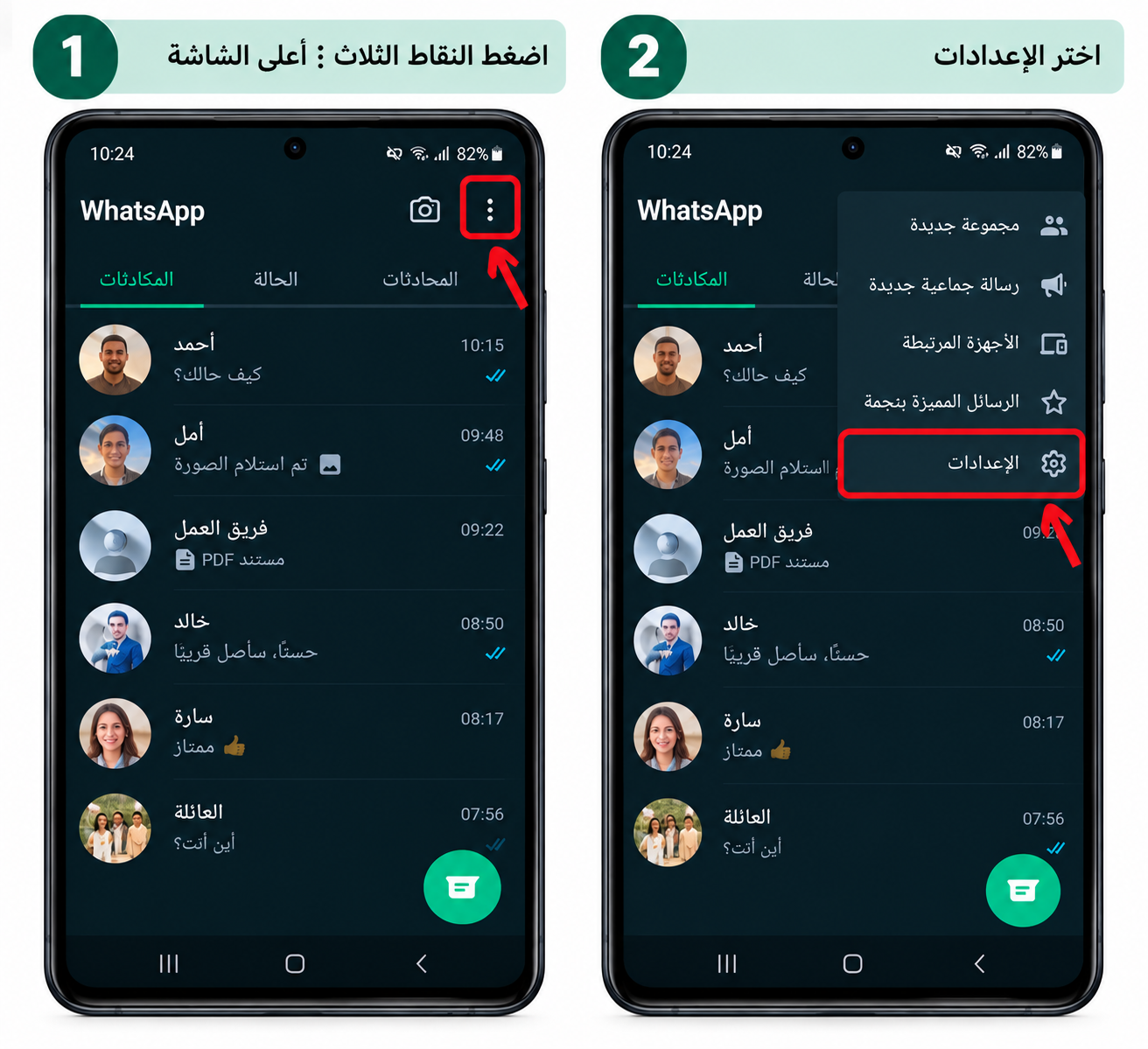
On Android: tap the three dots ⋮ at the top ← Settings. On iPhone: tap "Settings" at the bottom.
- 2
Step 2
Open two-step verification
Tap "Account" ← "Two-step verification" ← "Turn on" (or "Create PIN").
- 3
Step 3
Choose a 6-digit PIN
Enter a 6-digit PIN, then enter it again to confirm.
Tip: Don't use your birth date, 123456, or digits from your phone number. Never give this PIN to anyone — even if they claim to be from WhatsApp.
- 4
Step 4
Add your email address
Enter your email address and confirm it. You'll receive a confirmation link by email.
Tip: The email lets you reset the PIN if you forget it. Make sure it's an email you can access, and that it's also protected with two-step verification.
- 5
Step 5
You're done
WhatsApp will ask for your PIN from time to time to help you remember it.
Tip: If anyone asks you for a "verification code" or "6-digit code" by message or call — they're trying to steal your account. Never send it.